Doc · Open Source

Tessera

Beautiful touch screens for Home Assistant on affordable ESP32 panels. A drag-and-drop editor, no YAML, free and open source. Built solo, then the internet found it: 1,200 GitHub stars in two months, hundreds of thousands of YouTube views and €4,000 in donations in a single month.
Tessera
Click to zoom
Spec · 001

Project info

Year
2026
Category
Open Source
Brief · 002

About this project

Home Assistant can run your whole house, but the screens on the wall rarely look like something you would want there. Cheap ESP32 touch panels are everywhere, and getting a nice dashboard onto one meant YAML, LVGL configs and an evening of flashing. So most of them ended up in a drawer.

Tessera fixes that. Plug a panel into USB, run the wizard, and drag your lights, heating, music and cameras onto it from a single editor inside Home Assistant. From then on everything travels over Wi-Fi. The C++ firmware, the Screen Manager app inside Home Assistant, the website, the docs and the brand: all designed and built by me, on top of ESPHome and LVGL.

I put it on GitHub in September 2026. Two months later it has about 1,200 stars, 180+ forks, hundreds of thousands of YouTube views across videos by several creators, a busy community and €4,000 in donations in one month, from people who want it to keep going.

A screen the whole family uses
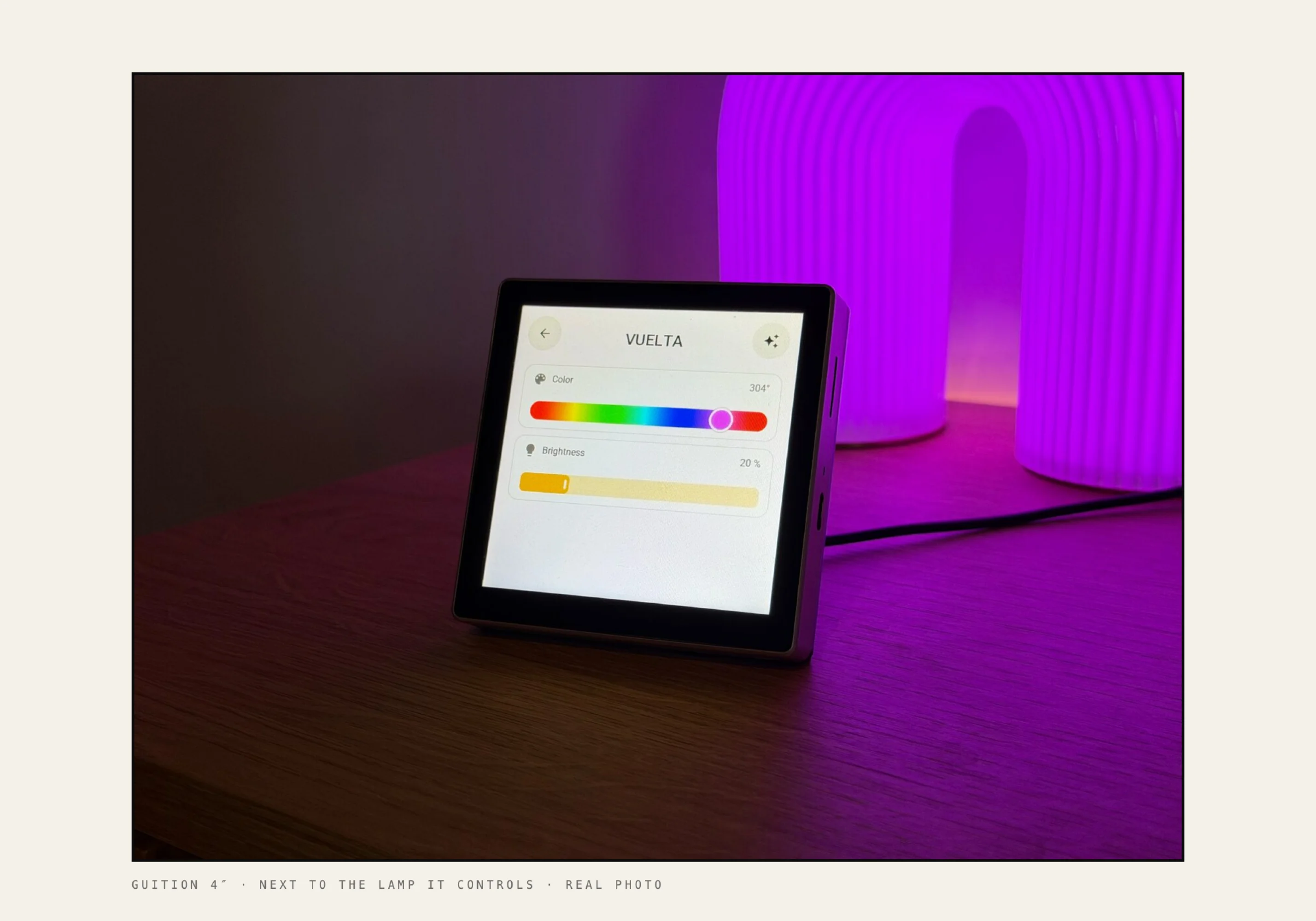
Guition 4″ · a real photo, not a render
The goal was never a dashboard for tinkerers. It was a screen that sits next to the lamp it controls, looks like it belongs there, and that everyone at home understands without a manual. A light looks like a light. Tap to switch it, hold for more. The hard part is everything underneath. Tessera hides all of it behind one button: Save & send.

The numbers, two months in

~1,200 · GitHub stars 183 · forks 100,000s · YouTube views, across videos by several creators €4,000 · in donations, in one month 1,479 · commits since 1 September 2026 62,000 · lines of C++ firmware 35,000 · lines of Python in the Home Assistant app 22 · supported screen profiles, 2.8 to 10.1 inch 35 · plugins · 9 languages 181 · wishes on the wishlist, 90 already shipped 1 · person who built it

Lives inside Home Assistant

Tessera panel · Home Assistant sidebar
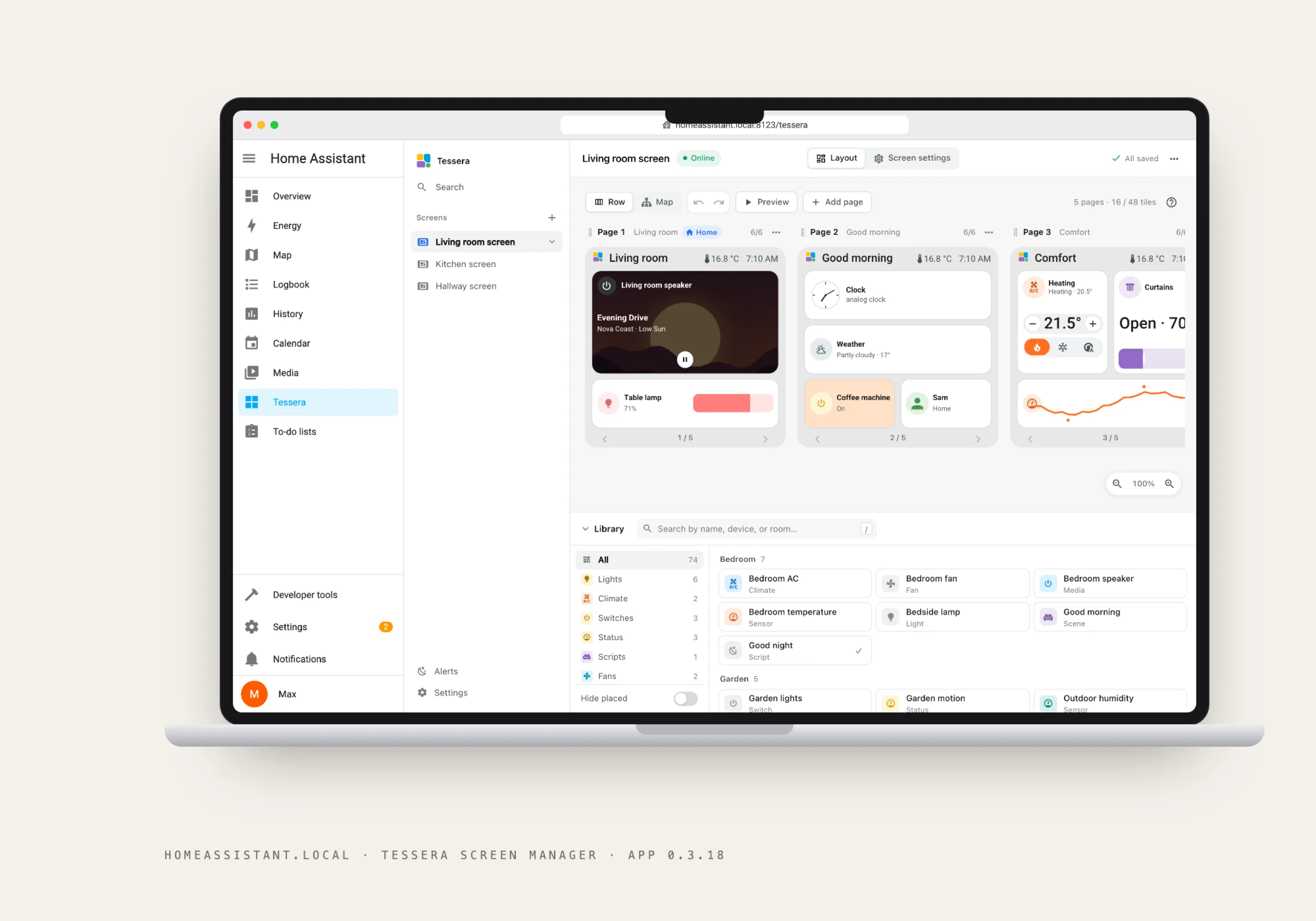
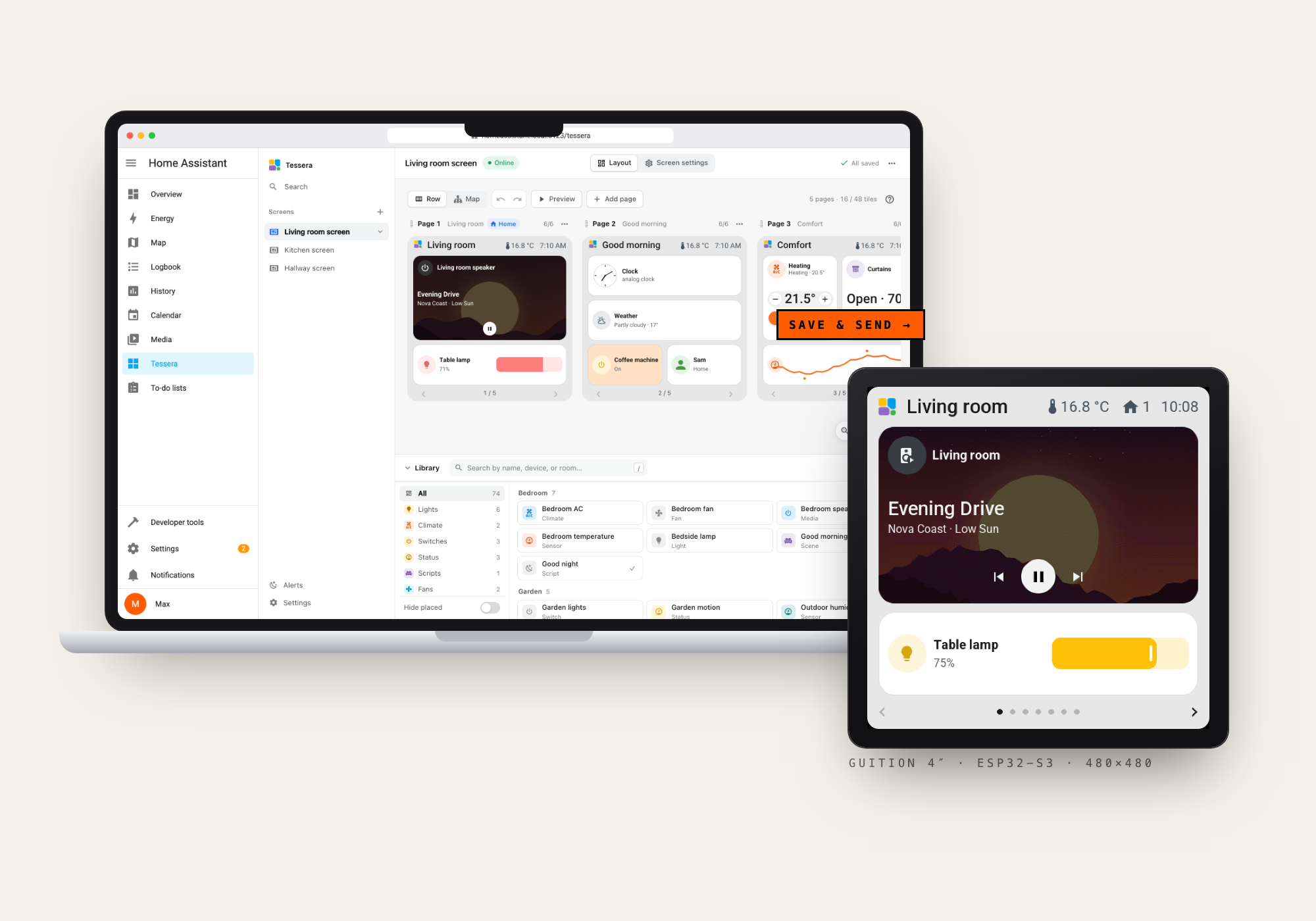
Tessera Screen Manager is a Home Assistant app with its own panel in the sidebar, right between Media and your to-do lists. One button adds the repository, one click installs it. Inside: every screen in the house, its pages side by side exactly as the panel will draw them, and a library of all your devices grouped by room. Drag a lamp onto a page, resize it, pick a pastel, Save & send. The screen updates over Wi-Fi a second later.

Design, written in C++

components/smart_display/climate_tile.h · and what it draws
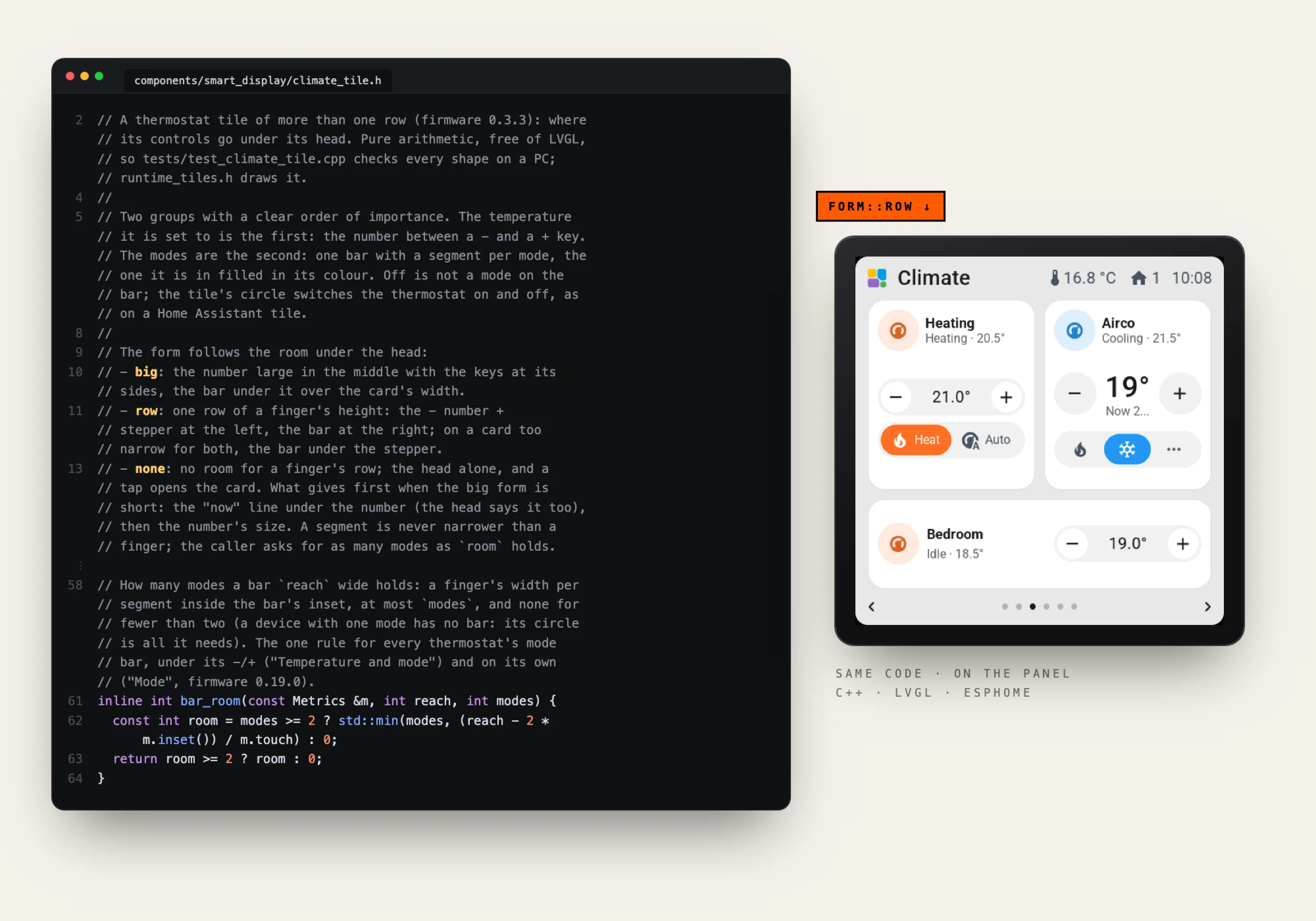
The firmware is a custom ESPHome component of 163 C++ files, drawing with LVGL straight onto the panel. And it reads like a design document. The thermostat tile decides its own shape from the room it gets: a big number with keys at its sides, a single finger-high row, or just its head. A mode segment is never narrower than a finger. That layout math is pure arithmetic with no LVGL in sight, so every shape is unit tested on a PC. The same code also renders on the desktop, which is why every screenshot on the Tessera site is real firmware output, not a design mock.

One firmware, 2.8 to 10.1 inches

Every size, to scale · CYD to Guition 10.1″
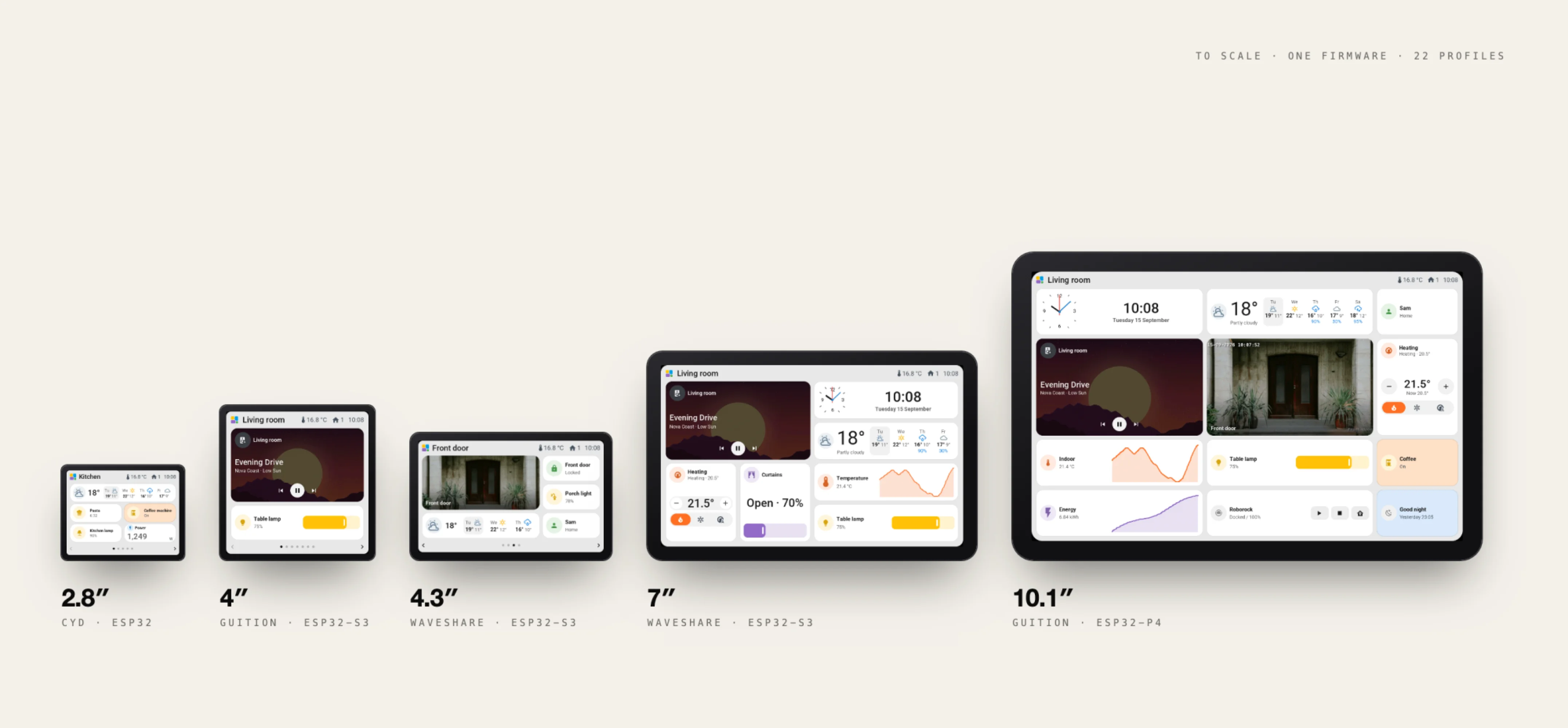
From a tiny 2.8-inch CYD in the kitchen to a 10.1-inch ESP32-P4 that runs the whole living room. The grid, fonts and touch targets adapt per board, so the same tile language works at every size. 22 profiles today, with new boards requested and voted in by the community.

Controls that feel familiar

Six full cards · Guition 4″ firmware renders
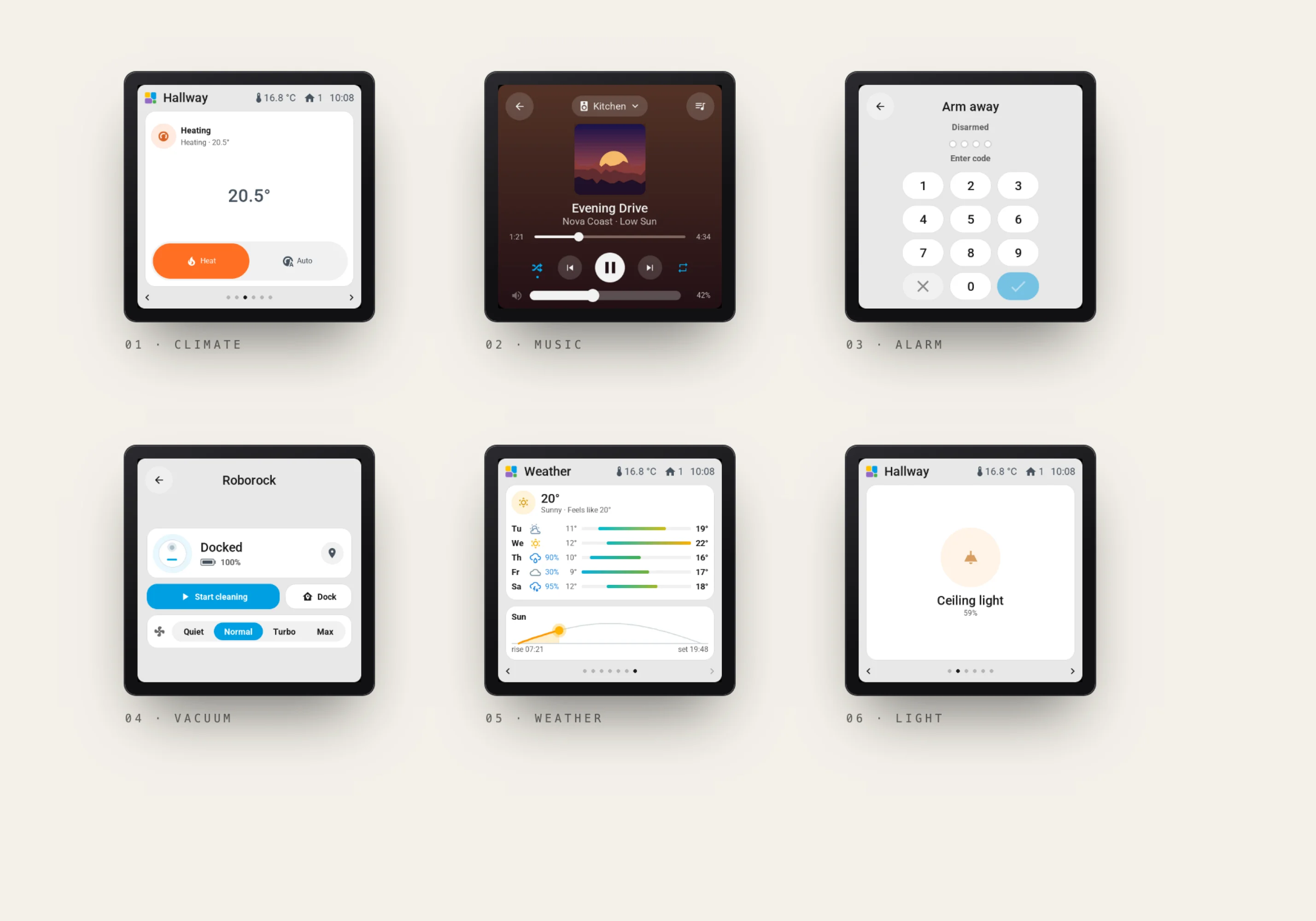
Every kind of device gets a card that works the way you expect. A thermostat with a big target and its modes, a music player with artwork and volume, an alarm keypad, the vacuum with its suction levels, a seven-day forecast with the path of the sun, a colour wheel for the lamp. Tap a tile to switch it, hold it for the full card. No training, no manual, nothing to explain to guests.

Live cameras on a microcontroller

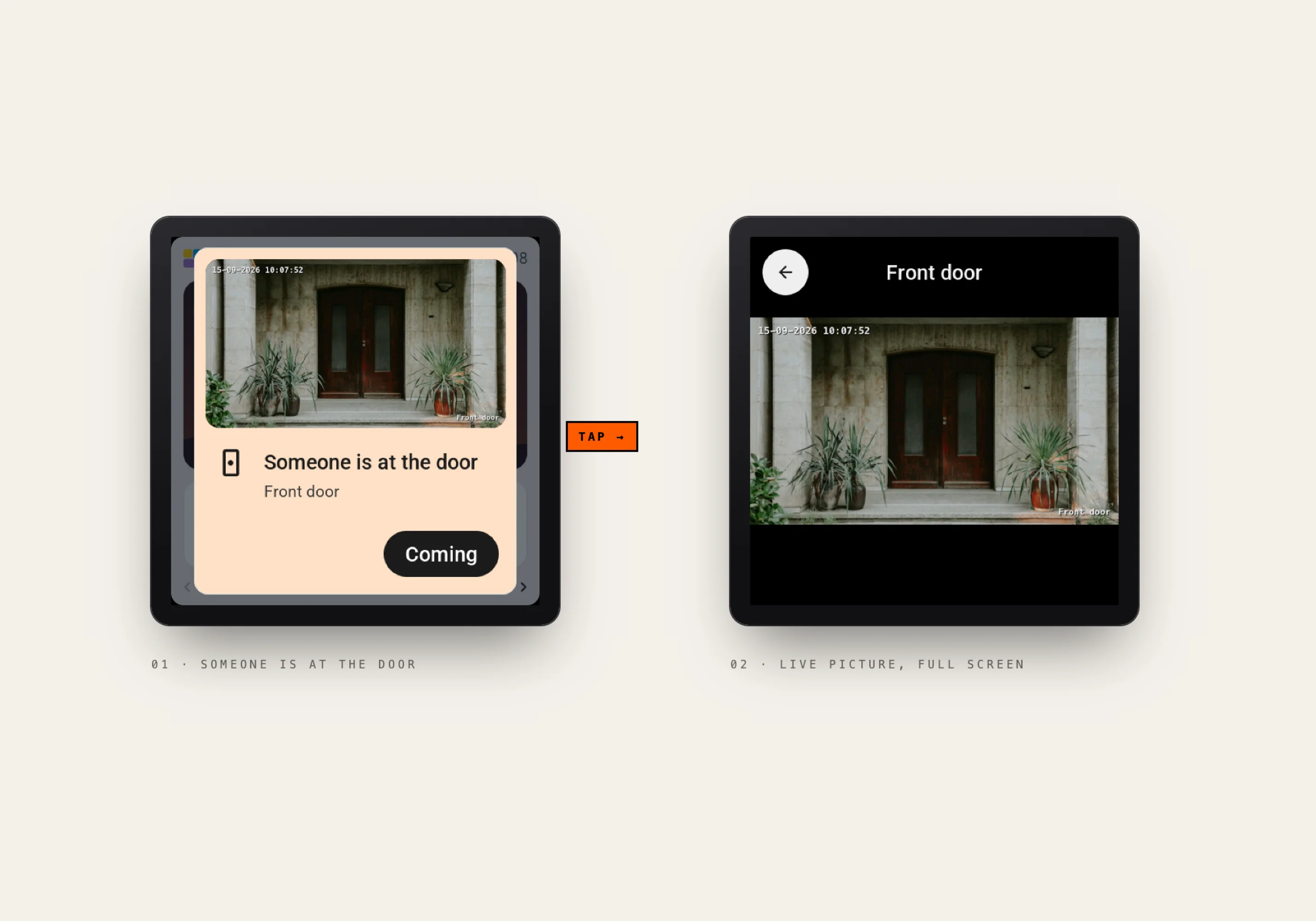
Doorbell alert → live picture
Someone rings the bell, and the screen shows who is at the door. Tap it and the live picture opens full screen. ESP32-P4 panels play Home Assistant camera streams on a tile or full screen, and on models with a speaker you hear it too. Live video on a chip this small took a lot of squeezing.

Edit from the sofa

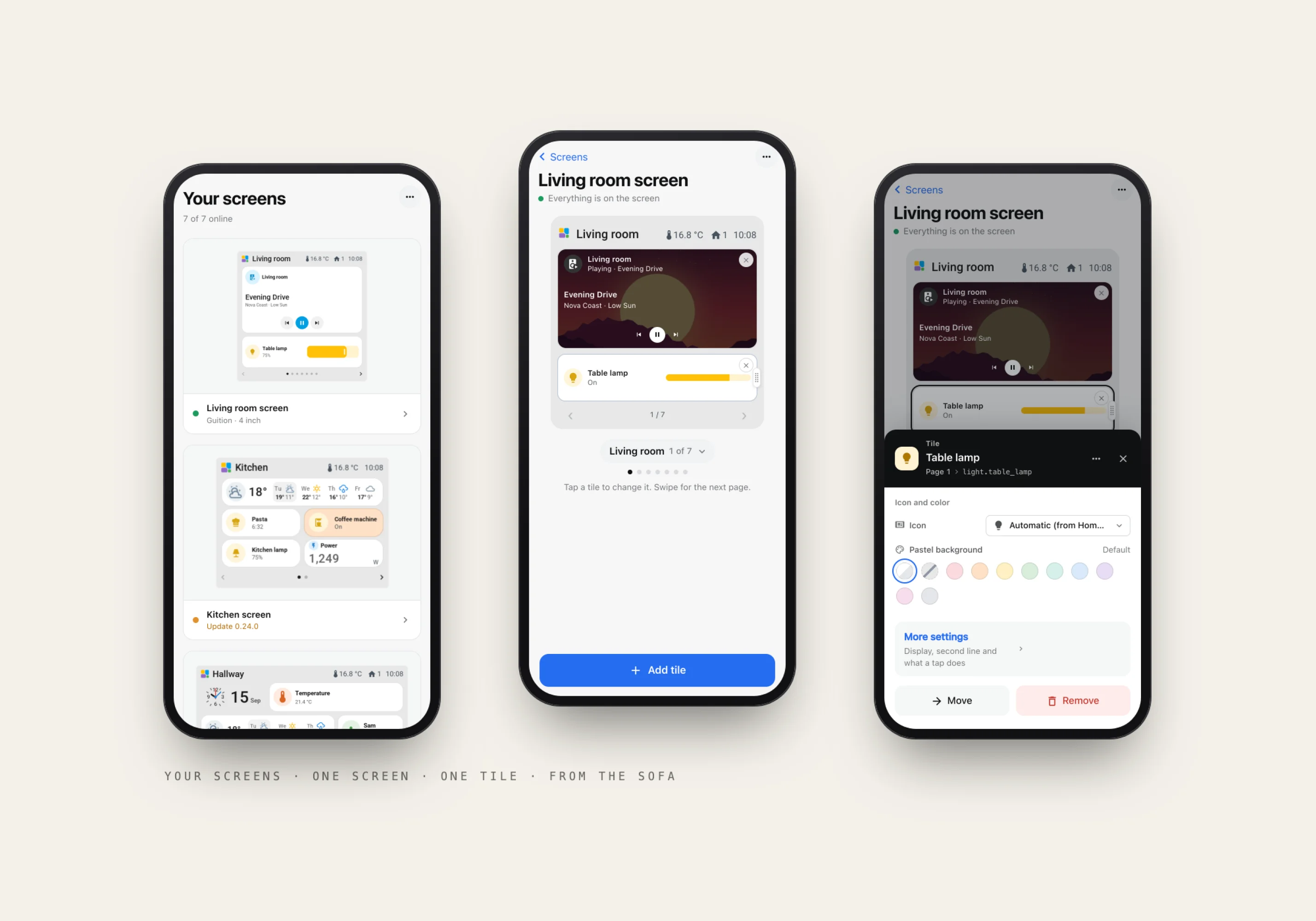
Tessera on a phone
Tessera on a phone
The editor has a phone layout of its own, not a squeezed desktop. Your screens with a preview of their first page, one screen as it looks on the wall, a tap on a tile to change its colour or what it does.

Plugins, made by the community

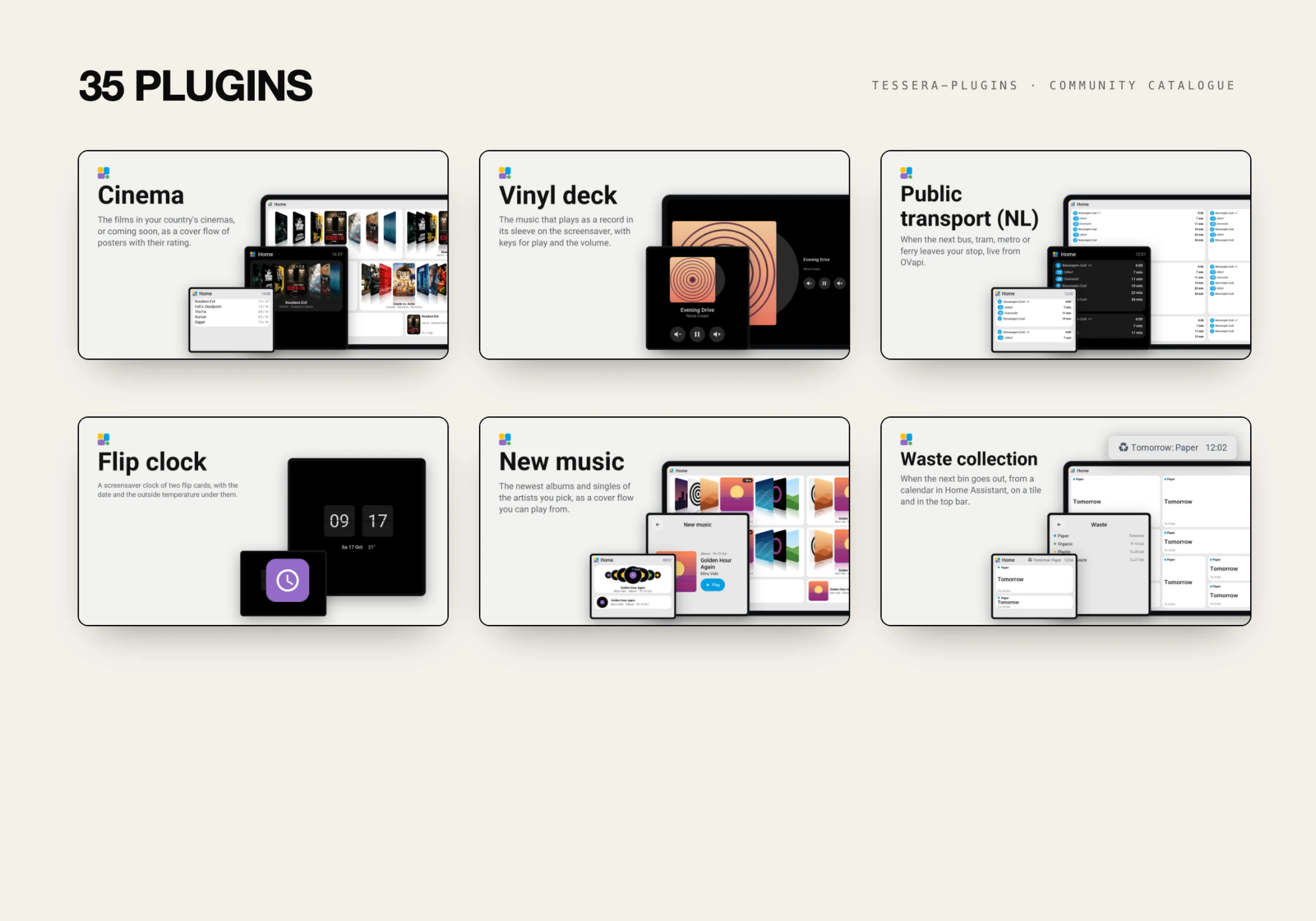
Plugin catalogue · 6 of 35
Tessera is a platform, not a fixed feature list. Plugins add tiles, screensavers and hardware features: live Dutch public transport departures, the films in your local cinema, a vinyl deck screensaver for whatever is playing, a flip clock, waste collection reminders and Home Assistant Voice, so the screen listens and answers through Assist. 35 plugins and counting. Anyone can build one from the template and share it in the catalogue.

Real screens, real rooms

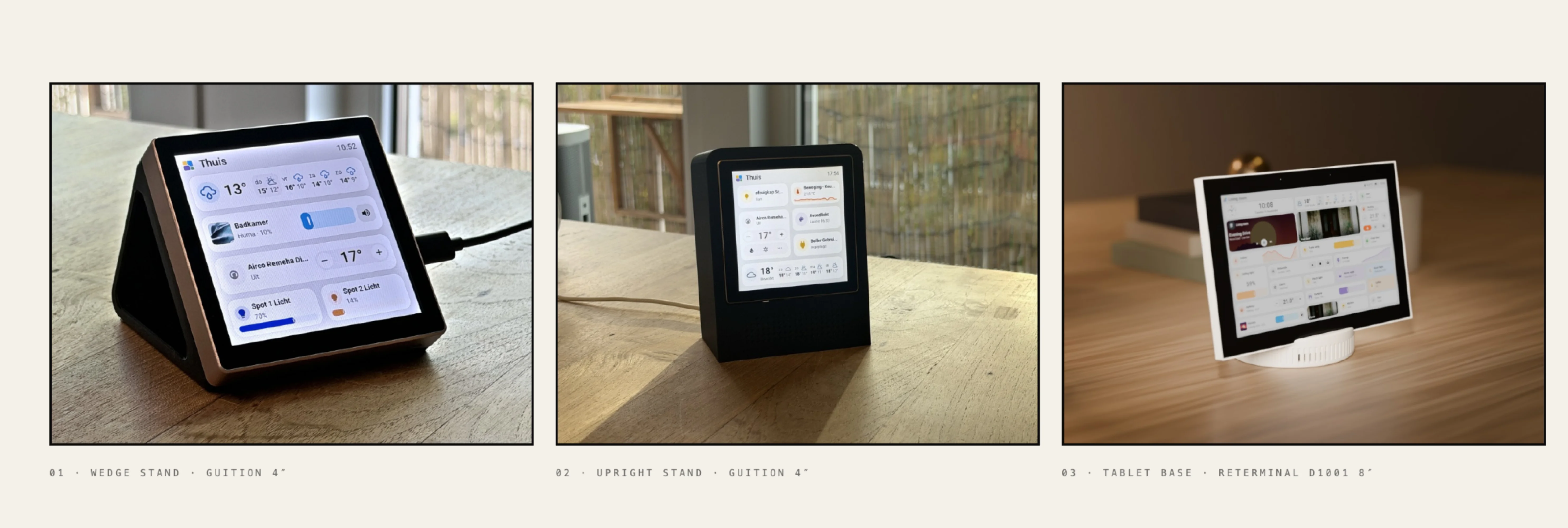
Three stands, free on MakerWorld
The screens need somewhere to live, so I designed stands for them too. Each one is free on MakerWorld with a ready print profile and no supports: a wedge, an upright one with a small heart in its speaker grille, and a round tilted base for the 8-inch reTerminal.

A tile in a mosaic

Brand · the Tessera mark and palette
A tessera is a single piece of a mosaic. The name points at the tiles on each screen, and at the screens scattered around a home. The mark is built from the interface itself: rounded tiles in unequal sizes, in the same amber, blue, purple and green the firmware uses for its icons. Soft corners, a little play, nothing shouty.

Then the internet found it

Wishlist · 181 wishes, 90 shipped
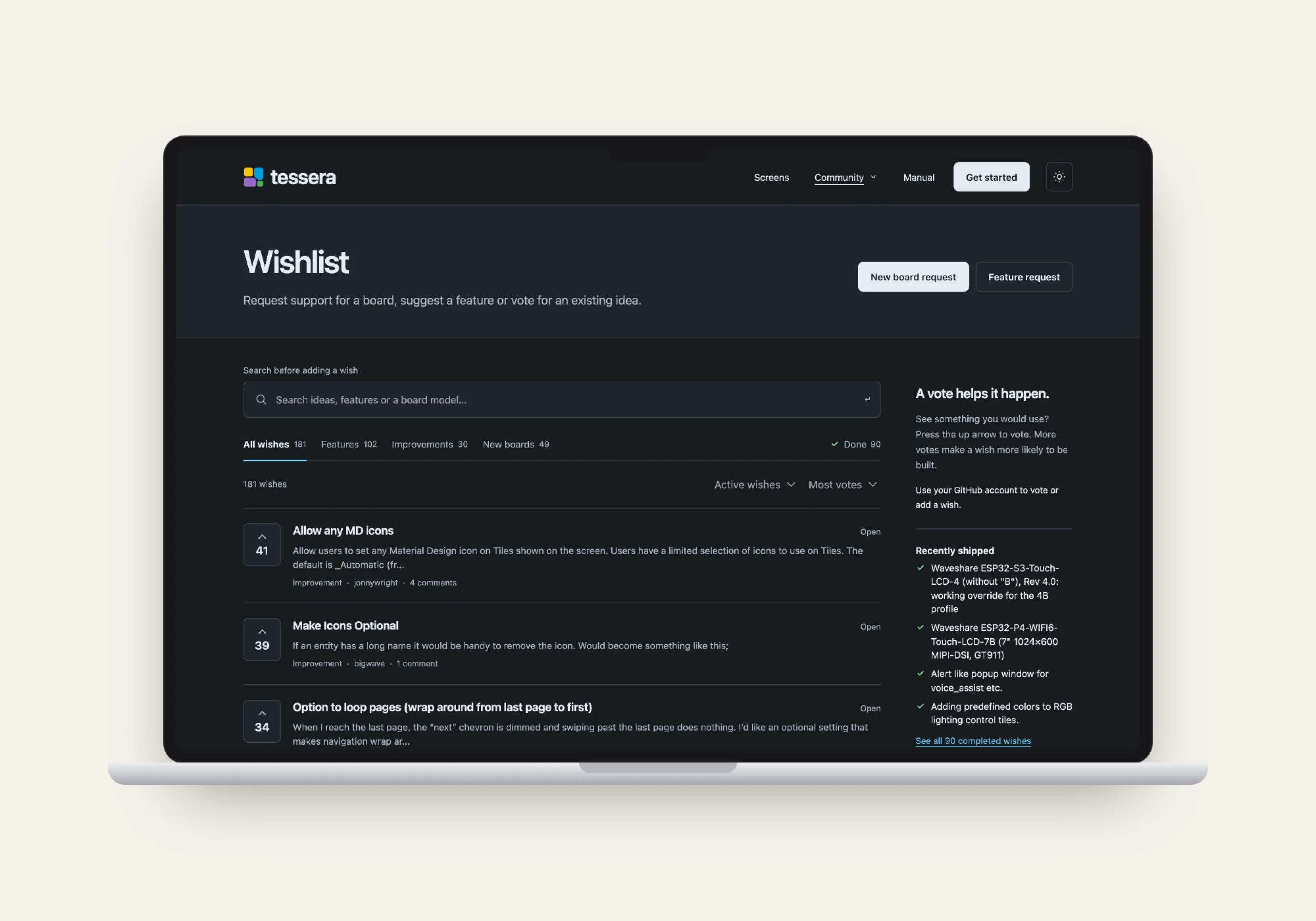
I shared it, and it took off. YouTubers started making videos about it, together pulling in hundreds of thousands of views. Stars went from zero to around 1,200 in two months. Strangers printed stands, translated the interface, wrote plugins and posted their walls in the gallery. The wishlist keeps the roadmap honest: 181 wishes, voted on with GitHub accounts, 90 already shipped. And people started donating: €4,000 in a single month. Not because they had to, Tessera is free and stays free, but because they want it to keep getting better.

Free and open source

Firmware and app are free under AGPL v3, with no subscription and no account needed. Code on GitHub, stands on MakerWorld, docs open for edits. Tessera is what happens when a music guy who loves gadgets gets annoyed by an ugly wall panel. Design first, then engineering until the design survives contact with a microcontroller.